Latest Postings
January 7, 2026
Revamped ISInc Website: Faster, More Intuitive IT Training Platform
We are proud to launch the revamped ISInc website at https://www.ISInc.com — a modern, faster, and more user-friendly platform designed specifically for our business and IT training customers.
This revamped ISInc website delivers significant improvements in search functionality, site speed, and mobile responsiveness while preserving the complex architecture that has powered our extensive course catalog for decades.
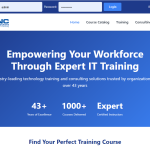
The Journey Behind the Revamped ISInc Website
For years, we explored options to modernize the site and consulted multiple web development agencies. Nearly all advised that upgrading to the latest version of PHP would require a complete ground-up rewrite due to the site’s sophisticated structure. Determined to find a better path, our sales team took matters into our own hands. With limited prior coding experience, we successfully migrated to current PHP standards in just one week — proving that deep system knowledge can overcome perceived obstacles.
Key Enhancements in the Revamped ISInc Website
- Brand-New Design – Clean, contemporary layout that maintains professional standards and improves readability on all devices.
- Improved Search Functionality – More accurate and faster onsite search, helping you quickly find the exact IT training courses, certifications, or resources your team needs.
- Faster Performance – Optimized code and the recent PHP upgrade (learn more about modern PHP benefits at the official PHP website) deliver significantly reduced load times.
- Enhanced Mobile Experience – Fully responsive design that works flawlessly on phones and tablets, so you can browse and register for courses anywhere.
These updates ensure the revamped ISInc website continues to support the advanced functionality our long-term customers depend on while offering a markedly better day-to-day experience.
We invite you to explore the revamped ISInc website today and see the difference for yourself. Your feedback is always welcome — feel free to contact us or leave a comment below.
Thank you for your continued partnership. We’re excited to support your team’s success with this upgraded platform and future enhancements to come.
—Mike Crawford and The ISInc Team
February 26, 2025
Many of you are either familiar or have heard of either Tableau or Microsoft Power BI.
At one point Tableau had advantages over Power BI, but with recent changes to the licensing structure for the Microsoft line and updates, (almost weekly), Power BI can do just about everything Tableau does. This all at the same time when Tableau drastically raised their pricing after being purchased by Salesforce.
Over the past 8 or so years, I have had the opportunity to work with dozens of State and County Departments to help implement custom dashboards and create customized classes.
During some discovery calls, I have customers say, “we’re going to utilize the Microsoft training first since it’s free. If we need something additional, we’ll contact you” or “we just want a 1-day class on how to build dashboards.”
I’m never disappointed, and always respond with something like, “No problem. We appreciate the opportunity to have talked with you and please keep us in mind for future classes”.
Fast forward a month or two later, I get a call they have exhausted the free Training from Microsoft as well as learn at your own pace options, which in no way satisfied their learning needs. Most equate it to the lack of labs or just the amount of information covered and connecting the pieces.
Ultimately, they still need training. We then work together to create a class, often times modifying the PL-300 class and it’s always a hit.
Well, it’s no surprise. What the heck is Power BI? Often, people think it is just an extension of Excel. They already know Excel so it should be an easy transition.
Not so fast. Power BI is actually a full suite of products/tools in Microsoft’s Business Intelligence line.
I thought I would give a very brief explanation below of what Power BI is.
Microsoft Power BI is a tool that helps you turn your data into easy-to-understand visuals and reports. It has three main parts: Power BI Desktop for creating reports, the Power BI service for sharing them, and Power BI Mobile apps for viewing them on the go. You can also make detailed reports with Power BI Report Builder and publish them on your own servers with Power BI Report Server.
Additionally, Power BI integrates with various external tools like DAX Studio for optimizing queries, ALM Toolkit for application lifecycle management, and Tabular Editor for advanced data modeling. It works with tons of different types of data and helps you see trends and insights clearly. With Power BI, you can make smart decisions based on your data.
Power BI is currently being implemented in many departments. If yours is one of them and you’d like to learn how we can help, or if you simply want to have a conversation to learn more about it, feel free to give me a call!
Have a great week. Let me know if this was helpful.
-Kris Crawford
August 28, 2024

What is Microsoft Copilot?
Copilot is an AI-powered productivity tool designed to enhance the way people work by integrating seamlessly with Microsoft 365 apps like Word, Excel, PowerPoint, Outlook, and Teams. It leverages large language models (LLMs) and data from Microsoft Graph to assist users in creating content, analyzing data, managing emails, and collaborating more effectively.
Key Features of Microsoft Copilot:
- Enhanced Productivity: Automates repetitive tasks, allowing users to focus on more strategic work.
- Creativity Boost: Helps generate ideas, draft documents, and create presentations with ease.
- Data Insights: Analyzes data and provides actionable insights, making data-driven decisions simpler.
- Seamless Integration: Works within the Microsoft 365 ecosystem, ensuring a smooth workflow across different applications.
Why Businesses Should Invest in Copilot Training:
- Maximize ROI: Training ensures that staff can fully utilize Microsoft Copilot’s capabilities, leading to better productivity and efficiency.
- Stay Competitive: Businesses that leverage advanced AI tools can stay ahead of the competition by optimizing their operations and decision-making processes.
- Employee Satisfaction: Reducing mundane tasks can lead to higher job satisfaction and morale among employees.
- Adaptability: As AI continues to evolve, trained staff will be better equipped to adapt to new features and updates, ensuring continuous improvement in workflows.
- Innovation: Empowering employees with AI tools can foster a culture of innovation, encouraging creative problem-solving and new ideas.
Investing in training for Microsoft Copilot can significantly enhance your team’s productivity and overall business performance. Would you like to know more about specific training programs or how to get started? Contact our sales team to learn how we can help your staff become proficient with Microsoft Copilot! Click here to see all available courses on Microsoft Copilot.
July 23, 2012

Office 2013 will soon be here, along with a new and improved version of the cloud-based Office 365. If you’re looking to upgrade, you have to decide whether the traditional desktop version of Office is the way to go, or if Office 365 is a better fit for your needs.
Office 2013 is impressive, but Office 365 is a better value in most cases.
1. Cost
Microsoft hasn’t yet shared what the price tag will be for the new Office 2013. But, unless it follows the same bold path laid out in offering Windows 8 for a mere $40, history suggests the new productivity suite will start somewhere in the $150 neighborhood.
Office 365 plans start at $4 per month. Small businesses can get access to Exchange, SharePoint, and Lync in addition to the core Office productivity applications for only $6 per month. Larger businesses that want to take advantage of Active Directory integration can do so for $8 per user per month.
Breaking those down, it takes more than three years to reach $150 based on the $4 per month plan, and more than 18 months under the $8 per month plan. The 18 months is less time than a business typically gets out of an investment in the desktop Office software, but it also comes with more than the software itself.
Of course, those are the current subscription prices and plans for Office 365, so those figures are subject to change as well.
2. Updates and Maintenance
What else do you get with your Office 365 subscription? An IT department. Sure, you can set up your own Exchange Server, SharePoint Server, and Lync infrastructure. You can manage and maintain the desktop Microsoft Office software, and install the patches and updates every month yourself. How much will that cost?
Consider that implementing the same capabilities in-house requires servers, and network infrastructure, and IT personnel to install, manage, update, and maintain it all. Plus, you still have to buy and maintain the Office software itself.
With Office 365, Microsoft takes care of all the dirty work so you don’t have to. Updates, patches, and upgrades just happen in the background without you needing to worry about it. When the server crashes, its Microsoft’s problem. When a hard drive needs to be replaced, Microsoft will handle it. You get the benefits of using Office without any of the headaches of updating and maintaining it all.
3. Accessibility
Office 365 lives in the cloud. That means you have access to Word, Excel, Outlook, and other Microsoft Office tools from anywhere you can get a Web connection, and from virtually any device–Windows or Mac desktops and laptops, Android devices, iPhones, iPads, and other smartphones and tablets.
Office Web Apps provide basic features and functions for free.This isn’t quite the selling point it once was for a couple reasons. First, even with the desktop Office 2013 suite Microsoft is pushing users to save files to the cloud-based SkyDrive, or to a SharePoint server by default. So, there’s no reason the data can’t be accessible regardless of whether you choose Office 2013 or Office 365.
The second reason it may not be all that compelling is that Office Web Apps are already available for free from the SkyDrive site. So, even without Office 365 users can create, view, and edit Word, Excel, PowerPoint, and OneNote files from the Web.
For businesses, though, SharePoint, Active Directory, and other elements of Office 365 that go beyond simply creating and editing Office documents still make Office 365 a better value.
Your mileage will vary of course. There are a number of factors involved in calculating the cost of purchasing, installing, configuring, updating, and maintaining Microsoft Office and the accompanying back-end services versus the ongoing subscription costs associated with Office 365. Office 365 is a solid service providing tremendous bang for the buck, though, so it won’t be easy to beat the value it brings to the table.
January 15, 2009
Do you have staff in remote locations, and find it difficult to get them the training they need? There comes a time when your resource is too valuable to send off site for a class. This is where ISInc’s e-Learning can come into play. Now your students can access the same classes via their desktop computer.
ISInc’s e-Learning training is live, interactive online training for those who would like to attend one of our face-to-face instructor-led training courses without leaving their offices, homes or classrooms. Learners can listen to the presentation, ask questions, hear others’ questions and get live answers, all from wherever they choose. They can engage in discussions with others in the physical classroom and throughout the country who are involved in the same class session.
ISInc’s e-Learning training blends the best from traditional face-to-face instructor-led training with the latest in conferencing technology, allowing us to deliver live training to multiple locations at one time. This model is based on our over 27 years experience as trainers and the general premise that the classroom is the foundation of a great training experience.
All courses offered at ISInc can be taken online via our live e-Learning training using Microsoft Lync. So, if you have employees in remote offices that you are trying to schedule for IT training, consider ISInc e-Learning Training. Please contact us for more information.
For more information on our e-learning and to view a video on how it all works, visit our e-learning page here.
August 5, 2008
DOD 8570 Requirements and Training
– The Department of Defense has put together a requirements list for anyone who works in Information Architecture (IA). You have to obtain at least one of the “approved certifications” to meet the minimum requirements for each category.
They have skills broken down into 6 certifications:
- Technical Level 1
- Technical Level 2
- Technical Level 3
- Management Level 1
- Management Level 2
- Management Level 3
Each of these levels requires you to have at a minimum one of the professional certifications listed below:
Technical Level 1
- A+ – CompTIA A+
- Network+ – CompTIA Network+
- TICSA – TruSecure ICSA Certified Security Associate
- SSCP – System Security Certified Practitioner
Technical Level 2
- GSEC – GIAC Security Essentials Certification
- Security+ – CompTIA Security+
- SCNP – Security Certified Network Professional
- SSCP – System Security Certified Practitioner
Technical Level 3
- CISSP – Certified Information Systems Security Professional
- SCNA – Security Certified Network Architect
- GISO – GIAC Information Security Officer
- GSE – GIAC Security Expert
Management Level 1
- GSLC – GIAC Security Leadership Certificate
- Security+ – CompTIA Security+
- GISO – GIAC Information Security Officer
- TISCP – TrueSecure ISCA Certified Security Professional
Management Level 2
- CISSP – Certified Information Systems Security Professional
- GSLC – GIAC Security Leadership Certificate
- CISM – Certified Information Security Manager
Management Level 3
- CISSP – Certified Information Systems Security Professional
- GSLC – GIAC Security Leadership Certificate
- CISM – Certified Information Security Manager
If you need to quickly get one of these certifications and you don’t see the class on our public schedule, please contact us. Also, we can provide on-site, customized training to help your group meet these requirements as well as online via our e-Learning training that utilizes Microsoft Lync to create a virtual classroom. Click here for additional information on our e-Learning training.
Please follow the link below for detailed DOD 8570 information:
DOD 8570 FAQ
The full DoD directive 8570 can be read or downloaded online.