One of the interesting issues I have found when building reports in Crystal is the nature of their record selection on blank data.
Let’s say, for example, I am building a report that displays my product names and sizes.
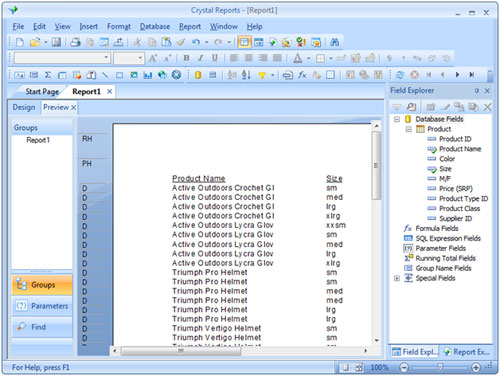
I don’t want to see any of the extra small (xsm) products so I add record selection to check if the size is not equal to “xsm”.
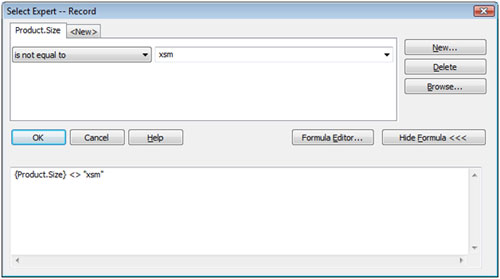
Formula:
{Product.Size} <> “xsm”
When I go back to my report, not only are all the extra small products missing, but so are all the products that didn’t have a size at all. This is normal database behavior that you might not be familiar with. Any time a database checks a null field (a blank field) against anything, it will always result in a value of false.
Thus, the following comparison results in a false.
“California” = Null
But, so does
“California” <> Null
Crystal will omit any records where the record selection criteria returns false, thus we will not see the products that don’t have a size. So how do we get those blank values back? Let’s add to our selection criteria a condition that checks for null values. Your new formula will use the IsNull() function to check to see if the size field is blank.
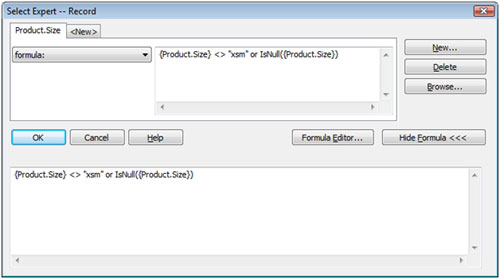
New Formula:
{Product.Size} <> “xsm” or IsNull({Product.Size})
Unfortunately, when preview your report, you will find that this doesn’t work. That is not because of a mistake in our logic but rather, what I consider to be a bug in Crystal Reports. If I took this exact same condition and applied it to the database records using a query analyzer or querying tool, I would see the blank records. Unfortunately, Crystal is not allowing the null values to come through even though our formula says that they should.
The trick to circumventing this bug is to put the IsNull() check FIRST in the formula.
Thus, if we rearrange the condition to this:
IsNull({Product.Size}) or {Product.Size} <> “xsm”
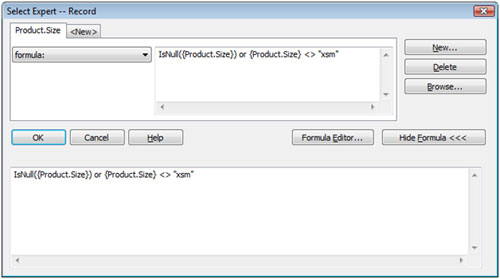
We will get our all of our products that aren’t extra small, including the products that have no value filled in for size.
As a rule of thumb, when using IsNull() in record selection criteria, make sure that it comes first in the formula.
September 20th, 2011 at 4:04 pm
this method has fixed my issue
tas
October 24th, 2011 at 1:49 pm
Thanks for the tip. I was pulling my hair out trying to include blanks and exclude other data. This worked perfectly.
November 16th, 2011 at 9:47 am
Thanks for the posting! I’m fairly new to Crystal Reports and I’ve had this problem on several reports and couldn’t figure out why it wouldn’t work.
The change in order fixed it.
November 29th, 2011 at 3:01 pm
[…] I have found when building reports in Crystal is the nature of their record selection on blank data.http://www.isinc.com/2008/10/10/record-selection-and-the-null-value-bug-in-crystal-reports/ Share this:TwitterFacebookLike this:LikeBe the first to like this post. Tags crystal, null, […]
January 10th, 2012 at 8:11 pm
*very nice post, i certainly love this website, keep on it
January 25th, 2012 at 9:50 am
Your post is appreciated. The counsel regarding putting the IsNull test before the “actual data comparison” test was particularly helpful.
January 28th, 2012 at 8:29 am
That is really fascinating, You’re an excessively skilled blogger. I’ve joined your rss feed and stay up for in search of more of your great post. Additionally, I have shared your site in my social networks
March 8th, 2012 at 11:28 am
Thank you! This solved a VERY frustrating problem I was having!
April 16th, 2012 at 12:54 am
Thanks for the tip … this also helped solved a similar problem that I was experiencing …
April 16th, 2012 at 1:00 am
My question however becomes … what if we have more than just one field in the data selection formular i.e.
e.g. (Product.Qty >= 10) and (Product.Size ‘xsm’)
Does that mean we have to use implementations such as :
”
( ( IsNull(Product.Qty) ) or ( Product.Qty >= 10 ) )
and
( ( IsNull(Product.Size) ) or ( Product.Size ‘xsm’ ))
”
if the answer is yes … then how am I ever going to be sure that my report is selecting only the correct kind of data that I want.
April 26th, 2012 at 9:44 am
This worked great! Thought I was going nuts. Keep posting. Big Thanks!
May 21st, 2012 at 9:38 am
It’s amazing how simple the answer is! Thanks!!
June 20th, 2012 at 12:25 pm
Thank you!
August 14th, 2012 at 7:58 am
tried your isnull formula to select just the null values for a field on my report and it returns zero records, it appears the report just locks up. We have several other criteria, after those selections i input the isnull formula as follows:
isnull ({fbdhr.HDR_RATE_TARIFF}) or {fbhdr.HDR_RATE_TARIFF ‘ALCAL’
am I stating it wrong or ar there other options to accomplish selecting the blank or “null” value records?
August 14th, 2012 at 11:51 am
Warren,
Try using the select expert for the isnull from the menu instead of a SQL statement. If that doesn’t work, send me a screenshot if you can to [email protected] and mention my name, Zach.
Zach
January 17th, 2013 at 4:25 pm
Thanks very much. Fixed the problem I was having in Crystal Reports 11.
May 10th, 2013 at 4:54 am
Thanks.
Saved my day.
June 19th, 2013 at 5:26 pm
length(trim()) = 0
No need for isnull and OR operator.
October 3rd, 2013 at 10:54 am
Yes you saved my day too.