Let ISInc start your organization with a free trial and get Office 365 up and running in your organization easily. The trial will let your users experience the value that Office 365 can bring to them. Begin your Office 365 experience with helpful scenarios and how-to documentation for your users and IT professionals – all from within your own Office 365 environment.
Ask an ISInc representative for information on how Office 365 can save your organization on hardware and IT support costs!
One of the features of the Terminal Server/Remote Desktop Client in Windows 7/Windows Server 2008 is the support for multiple monitors. If the machine running the TS-Client has a multi-monitor configuration that creates one logical rectangle, then the TS-Client can span over all the monitors, creating one virtual desktop of the combined size.
Specifically, the client needs the following for span mode to work correctly:
o Equal resolution monitors
o Total resolution of all monitors not exceeding 4096 x 2048
o Top-left monitor being the primary So, with this basic setup, let’s jump right in!
Step 1. Check the basics
Make sure both your monitors are using the same resolution and are oriented horizontally. Right click on the desktop. Click Properties.

In the Display Properties tab, make sure the monitors have the same resolution and are oriented horizontally. If not, adjust your monitor resolution and position so they are.
Step 2. Get the right version of Remote Desktop client
Check if you have the right version of Remote Desktop Connection client. You need at least version 6.0In the Start Menu > Run… dialog, type “mstsc” and hit enter.
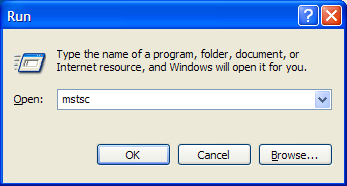
The acronym “mstsc” stands for “Microsoft Terminal Services Client” – another name for Remote Desktop Connection client. You can also start it from Start Menu > All Programs > Accessories > Remote Desktop Connection (or Accessories > Connections > Remote Desktop Connection)
The Remote Desktop Connection program should open up.
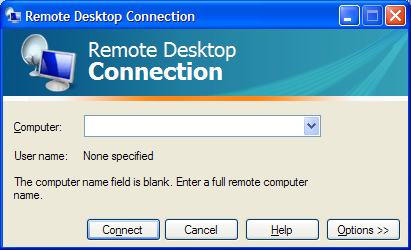
Click the monitor icon in the top-left corner of this dialog, and choose the “About” menu:
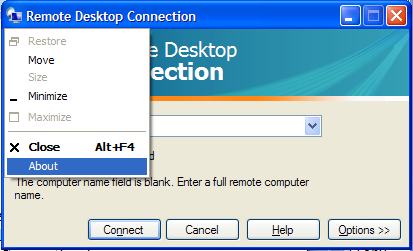
This will show the version of the Remote Desktop Connection client. It should be version 6.0 or higher:
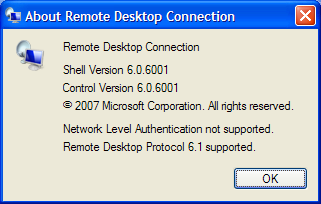
If you have an older version, first download and install the newer version from http://www.microsoft.com/downloads/details.aspx?FamilyId=6E1EC93D-BDBD-4…
Step 3. Connect to remote computer in ‘span mode’
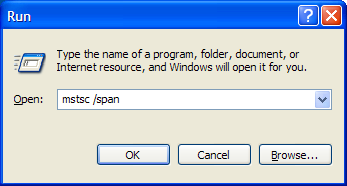
To have the Remote Desktop connection client use both your monitors, you need to start it in “span” mode. This is done by giving the following command in the Run dialog: mstsc /span
Open Start Menu, click Run. Then type in mstsc /span and hit Enter or Click OK
�
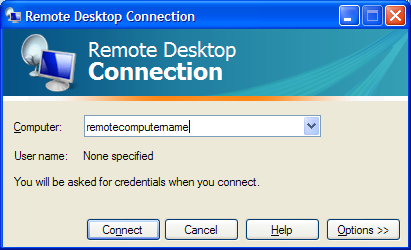
When the Remote Desktop client opens up, enter the remote computer name to which you are connecting, and click Connect.
The Remote session should open up and cover both your monitors.
Once you have this working, you may want to launch the remote session in an easier way instead of typing the ‘mstsc /span’ command everytime.
The next section shows how you can create an “RDP file”, so you can launch a spanned remote desktop session by just double-clicking a file/shortcut.
Creating an RDP file to launch a spanned remote desktop session covering multiple monitors
Create the RDP file
Open Start Menu, click Run. Then type in mstsc /span and hit Enter or Click OK
When the Remote Desktop client opens up, enter the remote computer name to which you are connecting, and DON’T click Connect. Instead, click the Options button.
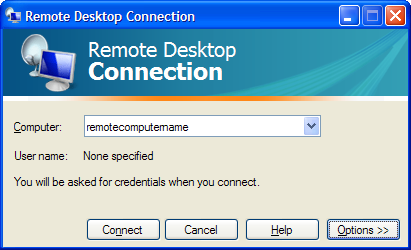
The window will open up to reveal more options:
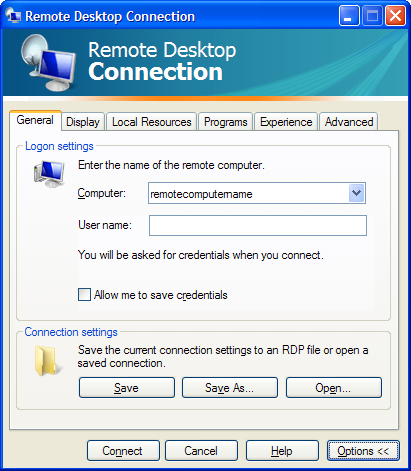
Click the “Save As” button. A “Save As” dialog will open to save the connection settings to a file. Save the file to a known folder, and with a name like remoteserver.rdp. In this example, let’s say we saved it to C:\remoteserver.rdp
Now, close the Remote Desktop Connection program. We are done with this for now.
Editing the RDP file
Open Windows Explorer, and browse to the folder containing the file you just saved (C:\remoteserver.rdp). Right click the file > choose Open With… menu > Choose Program…
In the Open With dialog, choose Notepad to open the file. Remember to NOT check/enable the “Always use the selected program to open this kind of file” option.
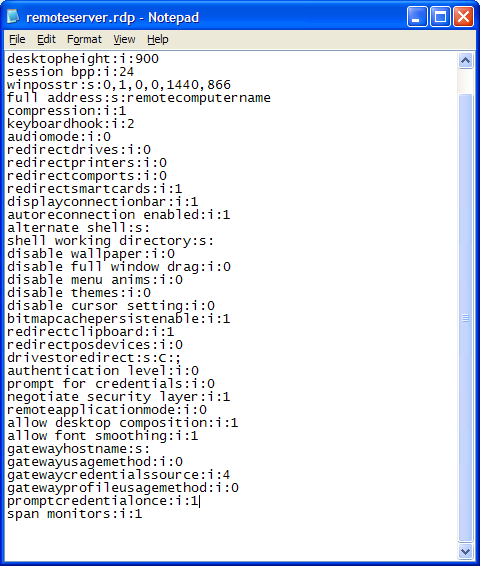
Click OK. The file should open up in Notepad. It is a file with many lines. We need to edit this and add one more line.
In the last line of the file, add the following command and hit Enter:
span monitors:i:1
The file should look something like this (note the last line added manually):
Save the file (File menu > Save) and exit Notepad.
Double click… and connect!
From now on, you can connect to the remote computer using both monitors (in span mode) by just double-clicking this file. To add a shortcut to your desktop, right click the file, and choose “Send To> Desktop (create shortcut)”. This will place a shortcut to this file on your desktop, and you can just double click the shortcut to remotely connect to the remote computer using multiple monitors in span mode.
Do you have staff in remote locations, and find it difficult to get them the training they need? There comes a time when your resource is too valuable to send off site for a class. This is where ISInc’s e-Learning can come into play. Now your students can access the same classes via their desktop computer.
ISInc’s e-Learning training is live, interactive online training for those who would like to attend one of our face-to-face instructor-led training courses without leaving their offices, homes or classrooms. Learners can listen to the presentation, ask questions, hear others’ questions and get live answers, all from wherever they choose. They can engage in discussions with others in the physical classroom and throughout the country who are involved in the same class session.
ISInc’s e-Learning training blends the best from traditional face-to-face instructor-led training with the latest in conferencing technology, allowing us to deliver live training to multiple locations at one time. This model is based on our over 27 years experience as trainers and the general premise that the classroom is the foundation of a great training experience.
All courses offered at ISInc can be taken online via our live e-Learning training using Microsoft Lync. So, if you have employees in remote offices that you are trying to schedule for IT training, consider ISInc e-Learning Training. Please contact us for more information.
For more information on our e-learning and to view a video on how it all works, visit our e-learning page here.
Running an Enterprise IT Environment has more cost than just the equipment and power that is used. Now we need to keep in mind the entire eco-system to run our infrastructure, from the power each machine uses to the amount of time people need to support it. Running a “Green” IT will not only help the environment, it will often relieve some of the stress on your IT staff.
Here are some steps your IT group can take to make your company more environmentally friendly. More »
ISInc is the 2008 Novell Partner of the Year for Training. This is a great accomplishment and it has to do a lot with our team here at ISInc. Thank you to all of our customers who have helped us achieve this benchmark within the Novell organization!
We have been a partner with Novell since their program inception. ISInc continues to maintain a Novell Platinum rating and we look forward to rolling out more services soon. Take a look at the classes we have to offer in the Novell section of our website.